Support that keeps its promises: SLA timers, shared inboxes and customer portals
A shared mailbox is a list of messages sorted by arrival. Support is a list of promises sorted by risk. This guide explains what an SLA timer actually enforces, the point at which an inbox stops coping, and which requests vanish from your queue once customers can see their own tickets.
11 July 2026 · 8 min read
On this page
- 01The Thursday the mailbox gave up
- 02What an SLA timer actually enforces
- 03Where a shared inbox stops coping
- 04Setting targets you can actually hit
- 05What a customer portal removes from your queue
- 06Tickets that start as phone calls
- 07When support needs the rest of the business
- 08What to check before you commit
The Thursday the mailbox gave up
It is four in the afternoon and the shared support mailbox has thirty-one unread messages. Two are from the same customer, who wrote on Sunday and again this morning because nobody replied. One has been answered twice, by two people, with two different answers. A fourth is marked as read, which in a mailbox means nothing: someone opened it, decided it belonged to finance, and closed the tab.
Nobody there is lazy. The tool has no opinion about who owns what, or when an answer was due. A mailbox sorts by arrival time; support work sorts by risk, meaning whatever is closest to breaking a promise you made in writing. Past a certain volume that mismatch stops being an irritation and starts costing renewals.
If you are comparing helpdesk software in the UAE, SLA behaviour is the first thing worth testing, because it is where most tools are shallower than they look. Three questions decide it: what a timer really enforces, why an inbox falls over once the queue grows, and which requests disappear once customers can see their own history.
What an SLA timer actually enforces
An SLA timer does not make anyone faster. It makes lateness visible before it happens, which is the only useful moment. Four mechanics do the work.
A clock per promise, not per ticket. First response and resolution are separate commitments with separate targets. A ticket can be healthy on one and breaching on the other, and if your tool only tracks a single age figure it cannot tell you which.
A working calendar. A four-hour response target means four working hours. The UAE working week, your own opening times, and public holidays all have to be encoded, or every Friday afternoon ticket looks like a catastrophe on Monday morning. A timer that counts wall-clock hours through the weekend produces numbers nobody trusts, and numbers nobody trusts get ignored.
Pause states. When you have asked the customer for a screenshot or an order number, the clock should stop, or your team is measured on someone else's response time and will quietly stop caring about the metric. It must also restart the moment the customer replies, without anyone remembering to press a button.
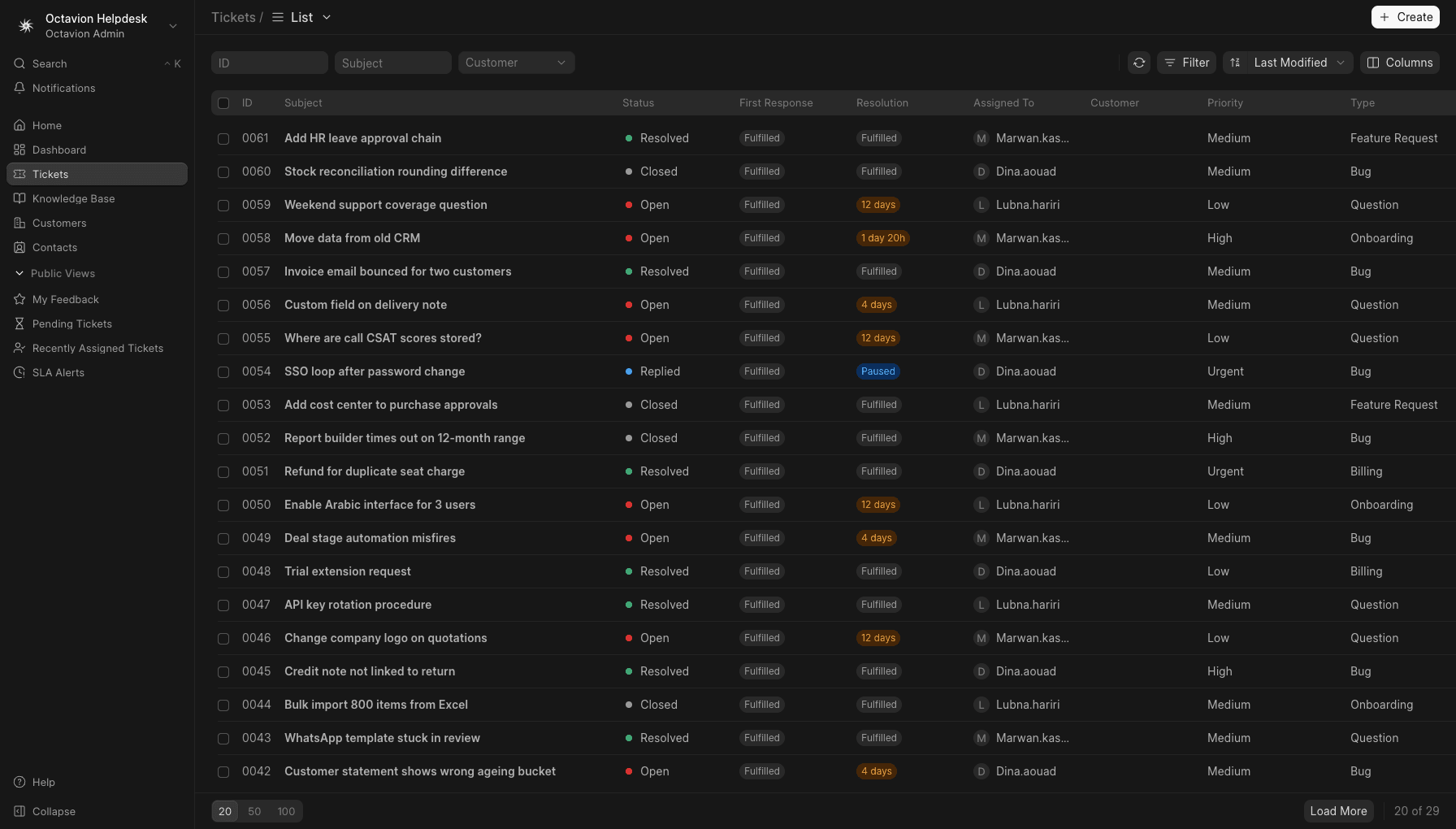
Escalation before breach, not after. A breached SLA is a report. An at-risk SLA is an action. The queue in the helpdesk app with SLA timers and a customer portal shows time remaining on every row and changes state as tickets approach their target, so a supervisor can reassign while there is still time left rather than read about the breach the following week.
That last point is the whole argument: everything else in a helpdesk is convenience.
Where a shared inbox stops coping
There is no exact threshold, but the pattern is consistent: at some volume a mailbox accumulates more exceptions than rules, and the failures stop being individual mistakes and start being the shape of the tool.
Ownership is the first casualty. A mailbox has no assignee field, so ownership lives in a colour-coded flag, a chat message, or someone's memory, and moving the person takes the memory with them. State is the second: read is not in progress, and archived is not resolved. You cannot report on a status that was never recorded, nor hand a queue over at the end of a shift when the only account of it sits in a colleague's head.
Then threading turns against you. Two issues arrive in one reply chain and become one thread forever. A customer replies to a three-month-old email and reopens a conversation nobody is watching. Someone adds a colleague on CC and the reply-all splits the history into two branches, only one of which the customer sees. Together they mean the written record no longer matches what happened, and people stop trusting it.
The final failure is the expensive one: you cannot answer basic questions. How many tickets did we handle last month? Which accounts generate the most work? What proportion of requests met our stated target? A mailbox holds all the raw material and exposes none of it. That blindness usually makes the decision, not the daily friction, because it stops you fixing causes instead of symptoms.
Setting targets you can actually hit
The most common mistake is publishing targets before measuring where you actually stand. Without a baseline, one-hour first response is a wish, and a first month of red rows teaches the team to ignore the colour.
Start with two or three priorities, never five. Real severity comes from business impact, not from how loudly the request was made: the customer cannot invoice, the customer cannot log in, everything else. Define each level in a sentence a new hire can apply without asking, then set targets slightly looser than your measured average and tighten once the queue is stable.
A few habits keep the numbers honest:
- Measure first response separately from resolution, and report both. A fast acknowledgement with a slow fix is a different problem from the reverse, and needs a different remedy.
- Review breached tickets weekly for causes rather than for blame. Most breaches cluster around one queue, one product area, or one hour of the day.
- Keep holiday and opening-hours calendars current, because a stale calendar silently corrupts every figure that follows it.
Targets that hold up are boring targets. The aim is a queue where a red row genuinely means something is wrong.
What a customer portal removes from your queue
A portal is often sold as a self-service knowledge base. The knowledge base helps, but the larger saving is duller: it removes the status-chasing traffic.
Count how many inbound messages ask for an update on something already open. In most teams it is a meaningful slice, and each costs a context switch to answer with information the customer could have read themselves. When they can log in and see the ticket, its owner, the last update and the target, that traffic largely stops.
A portal also fixes identification. An authenticated request already carries the account, the contact and the history, which removes the opening exchange where you ask which company they are from and they reply from a personal address. It gives attachments somewhere sane to live, and the customer a full record of past issues, which is what procurement asks for at renewal.
What it does not do is replace a person. Portals deflect repeat questions and status checks; they do not resolve hard tickets, and one presented as a wall in front of your team will be resented. Publish articles for the ten questions you answer most often, keep a visible route to a human, and let deflection be a side effect rather than a target.
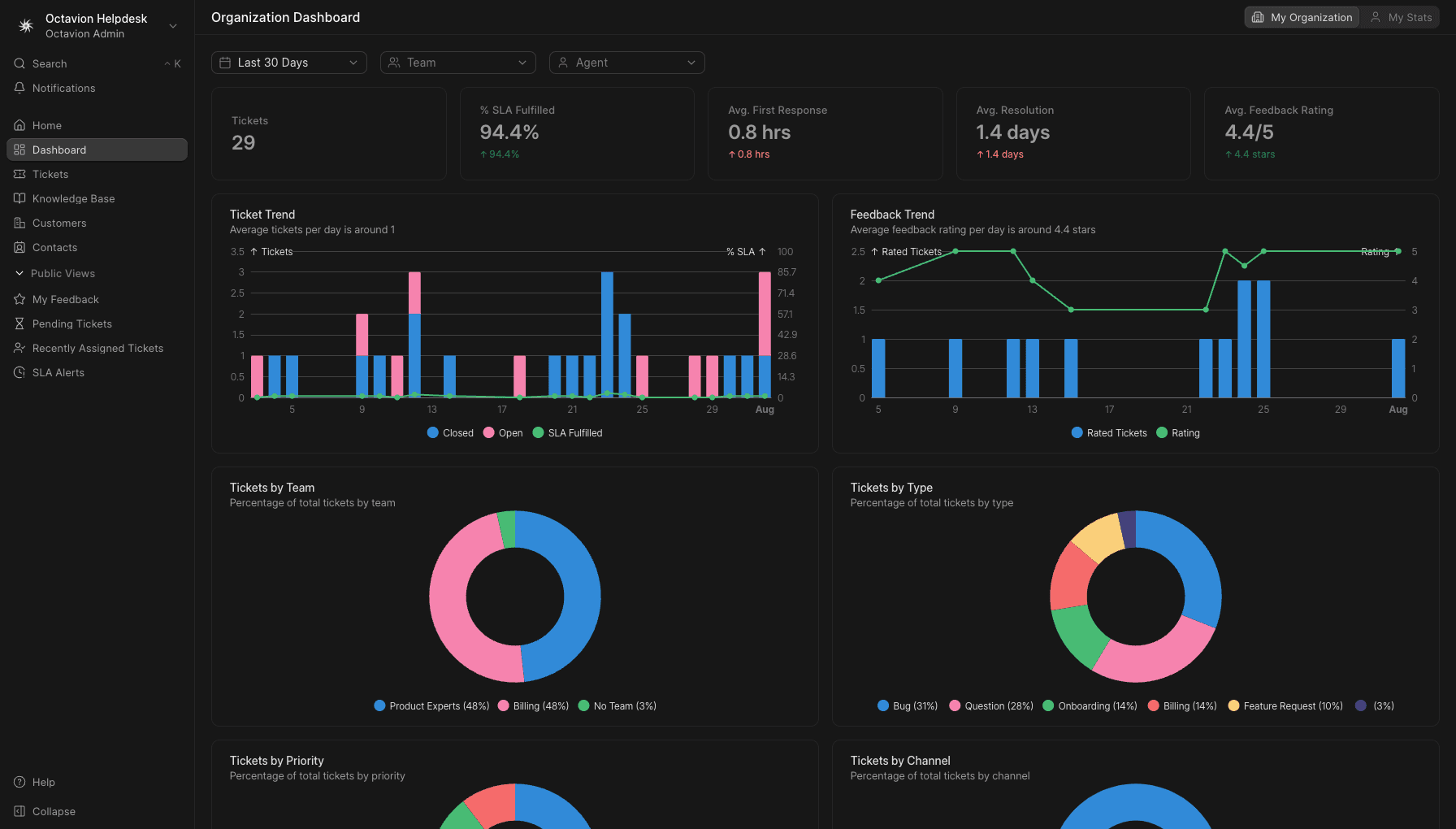
The dashboard tells you whether any of this is working: volume by channel, tickets approaching their target, and how this week compares with the last.
Tickets that start as phone calls
Plenty of support still arrives by voice, and a call is not a ticket until somebody creates one. That gap is where promises quietly disappear: the caller was helped, nothing was recorded, and the issue returns next month as a new conversation with no history.
Closing it means putting the phone and the queue on the same account. The smart call centre with IVR, queues and recording handles the voice side, including supervisor listen, whisper and barge, queue callback so nobody waits on hold, and voicemail delivered to email so an out-of-hours message lands where the team already looks. Recordings carry AI transcription, summary and sentiment, which means a ticket raised after a call starts with a written account of what was said instead of a one-line note.
Text channels deserve the same. Live chat on your website and WhatsApp on the official Meta Business Platform both feed the same queue, so an SLA target applies wherever the customer chose to write. Channel-specific inboxes recreate the fragmentation you are trying to leave, one silo at a time. The full catalogue of apps that share one account and one login is worth reviewing before you commit to separate tools per channel.
When support needs the rest of the business
A surprising number of tickets are not support tickets. They are billing questions, delivery questions, or a request to change an order. In a standalone helpdesk each becomes an internal email to another team, and the SLA clock keeps running while the agent waits.
This is where sitting beside your operational data pays for itself. When invoices, stock and payments live in the ERP with 5% UAE VAT, AED invoicing and multi-warehouse stock, the agent can check the invoice rather than ask about it. When the account history, deals and call logs sit in the CRM with click-to-call and automatic call logging, they know who they are talking to and what was promised during the sale. For the finance side of that picture, our guide to what a VAT-ready ERP has to do in the UAE covers the requirements in detail.
The voice-first AI assistant in Arabic and English reads the same live data, so an agent can ask for a customer's outstanding balance without leaving the ticket, and can create a record from what it is told. Staffing questions from the same accounts often end up in HR and payroll with WPS-ready processing, which sits on the same platform rather than behind a separate subscription.
What to check before you commit
Evaluate with your own queue, not a demo dataset. Import a week of real messages and watch a Sunday morning unfold.
- Does the timer respect your working calendar and pause while you wait on the customer?
- Can a supervisor see at-risk tickets before they breach, and reassign in one step?
- Does a portal login show the customer their full history, not just open items?
- Do chat, WhatsApp and phone land in the same queue under the same targets?
- Does the interface work in Arabic and English for the people who will actually use it?
Everything described here is hosted and run by us rather than on hardware you maintain, each tenant is kept isolated, and it is sold per seat per month in AED. There is a 7-day trial, long enough to run a real week of tickets through the system, which is the only test that settles the question. See per-seat pricing in AED to work out the cost for your team size, read the answers to common questions about seats, data and trials, or go through the product documentation if you prefer to know the mechanics first. When you are ready, start the 7-day trial and put your own queue behind a timer.